Exit a DV
Introduction
Users looking to exit staking entirely and withdraw their full balance back have two options:
- Exit via Withdrawal Address (Recommended for Post-Pectra): If your cluster's withdrawal address is an EOA or OVM, you can trigger an EL exit directly from the Launchpad without needing validator keys or operator coordination. This is the simplest method and is described in the Exit via Withdrawal Address section below.
- Exit via Validator Keys (Traditional Method): This method requires signing and broadcasting a "voluntary exit" message with validator keys. In the case of a DV, Charon nodes need to broadcast a partial exit to the other nodes of the cluster. Once a threshold of partial exits has been received by any node, the full voluntary exit will be sent to the beacon chain. This process will take 27 hours or longer depending on the current length of the exit queue. Once the validator is exited, the principal plus unclaimed rewards will go to the withdrawal address of the validator. Depending on the cluster's withdrawal configuration, users can claim their proportion of principal and rewards.
For the traditional validator key-based method, there are two ways to sign the partial exit and broadcast the full exit. Neither solution requires gas:
- Using Charon's exit solution - It is an Obol hosted solution which is facilitated by Obol APIs. It provides several benefits such as signing partial exits for multiple validators at once, live monitoring of partial exits status via Launchpad and ability to download partial exits and broadcast them later as required. Users don't have to worry about the intricacies of validator clients. Charon Exit abstracts all the complexity.
- Using the Validator Clients directly - Users can also directly use the validator client that is connected to your Charon client to submit partial exits, as the client only signs a partial exit message using its share of the private key. Charon will combine the partial exit messages from the other operators. Once the threshold is reached, they are submitted to the beacon node. All of this is usually wrapped under a single command and hence users cannot download full exit signatures for broadcasting it later. In this case, users cannot use Launchpad to monitor exit status and will have to use Grafana to query the partial exit status.
For the traditional validator key-based exit method:
- A threshold of operators need to run the exit command for the exit to succeed. This is the same threshold as is specified during cluster creation.
- Ensure that all operators within a cluster consistently use either the hosted solution (Charon Exit) or the non-hosted solution (Validator Client Exit). Mixing both solutions within the same cluster—where some operators use Charon Exit while others use Validator Client Exit—is not allowed.
- In case of validator client native exits, partial exits can be broadcast by any validator client as long as the threshold for the cluster is reached.
- If a Charon client restarts after the exit command is run but before the threshold is reached, it will lose the partial exits it has received from the other nodes. If all Charon clients restart and thus all partial exits are lost before the required threshold of exit messages are received, operators will have to rebroadcast their partial exit messages.
- All operators need to use the same
EXIT_EPOCHfor the exit to be successful. Assuming you want to exit as soon as possible, the default epochs included in the below commands should be sufficient for the respective network.
Exit via Withdrawal Address (Post-Pectra)
Post-Pectra fork, withdrawal addresses of validators can trigger an EL (Execution Layer) exit directly. This method allows the withdrawal address (EOA or OVM) to initiate exits without requiring validator keys or coordination between operators. This is an alternative to the validator key-based exit methods described below.
When to use this method: If your cluster's withdrawal address is an EOA or OVM, you can use this simpler method to exit validators directly from the Launchpad, without needing to coordinate with other operators or use validator keys.
How to Trigger an EL Exit
In the Launchpad, you can initiate an EL exit using the Exit validator button in the actions column of the validators table. To trigger an EL exit, you must meet one of the following conditions:
- Connected with the withdrawal address: If the withdrawal address is an EOA (Externally Owned Account), you must be connected with that EOA wallet.
- Have WITHDRAWAL_ROLE: If the withdrawal address of the validator is an OVM, you must have
WITHDRAWAL_ROLEin that OVM. Read more about how to assign roles here.

Step-by-Step Process
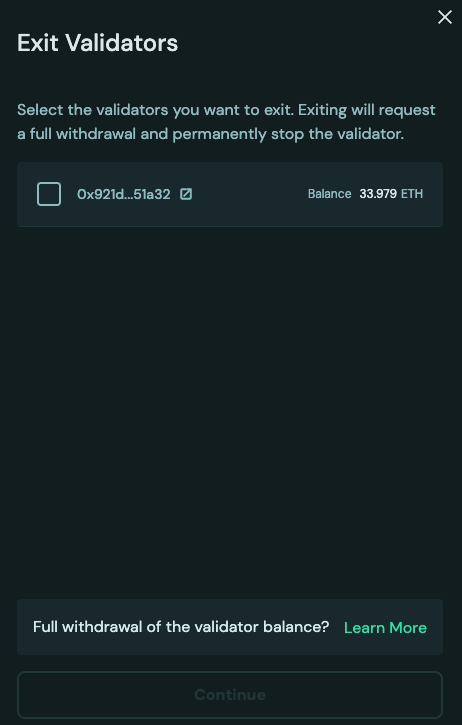
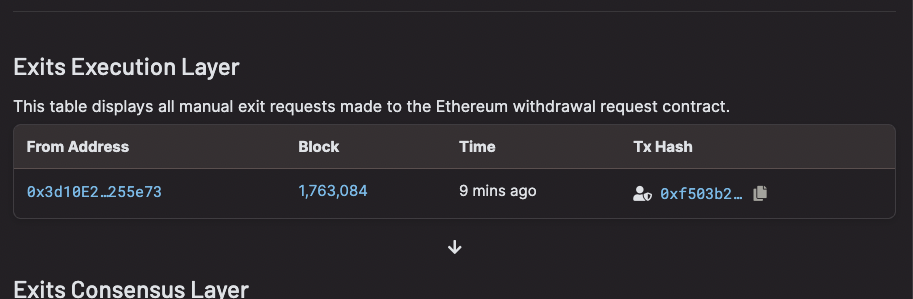
- Initiate Exit: Upon clicking the Exit validator button, you can multi-select the active validators you would like to exit. In the example below, there is only one active validator, so only one can be selected for the exit.
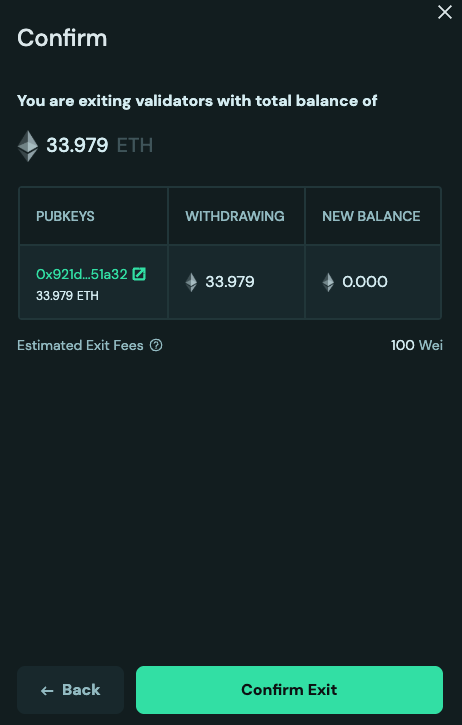
- Review and Confirm: You will see a confirmation page showing the validators that will be exited. If you are sending exits via EOA, it will require exiting validators one by one. In the future, we will use EIP-7702 to perform a single-click exit for all validators.
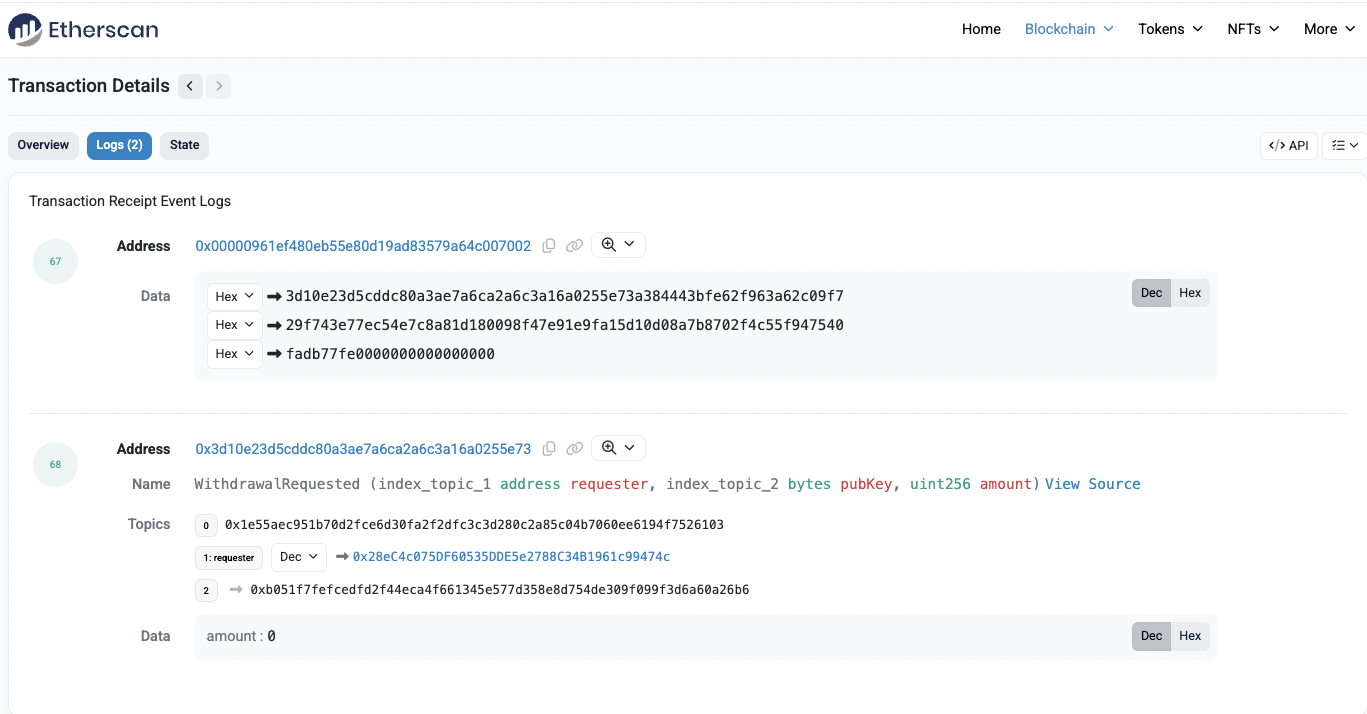
- Transaction Submission: Once the exit is submitted, a transaction will be sent with
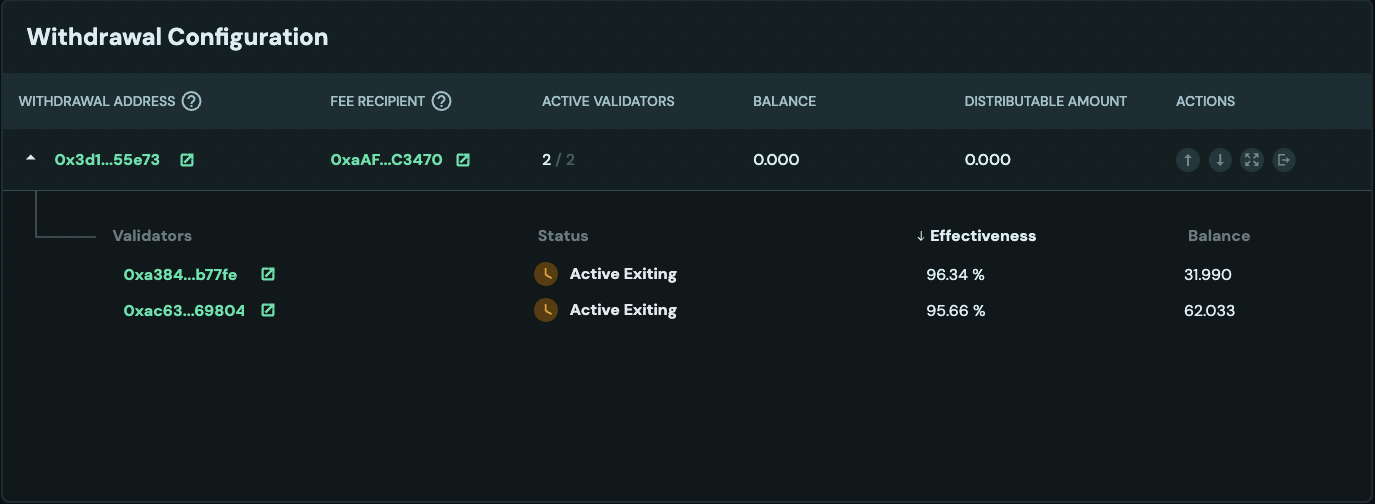
0as the withdrawal amount. This signals the beacon chain to exit the validator. Once the transaction is processed, validators will enter theActive Exitingstage.
Important: You must keep the nodes up as validators have only entered the exit queue. Once the exit is processed and there are no more active validators on the node, you can bring the node down.
- Exit Completion: After the exit is complete, the total balance will be sent to the OVM after the required on-chain withdrawal sweep has finished. At this point, you can distribute the principal and rewards, which are then claimed via the operator page.
🚨 Crucial Warning: You must distribute any existing undistributed rewards before the exit process finishes. If you do not perform this distribution beforehand, the exiting principal amount will be combined with the remaining rewards upon completion. This combined value will then incorrectly exceed the principal distribution threshold, which will cause the rewards to be mistakenly sent to the principal recipient when you initiate the final distribution.
For more information on distribution, see the Distribution guide.
Exit via Validator Keys (Traditional Method)
The following sections describe the traditional method of exiting validators using validator keys, which requires coordination between operators in the cluster.
Choose the correct combination of:
- Network : Mainnet or Hoodi
- Exit Type : Hosted (Charon) or Non-hosted (Validator client)
- Validator Quantity: Exit single or Exit all validators:
- Hoodi
- Mainnet
- Charon
- Teku
- Nimbus
- Lodestar
- Lighthouse
- Prysm
- DappNode
Voluntary exit can be submitted directly through Charon. This approach is validator client agnostic as Charon abstracts validator client's native exit commands underneath.
Step 1: Submit partial exit
- Single Validator
- All Validators
Following command signs a partial exit for a specific validator pubkey.
docker exec -it charon-distributed-validator-node-charon-1 /bin/sh -c 'charon exit sign \
--beacon-node-endpoints="http://lighthouse:5052" \
--validator-public-key="<VALIDATOR_PUBLIC_KEY>" \
--exit-epoch=256'
Replace <VALIDATOR_PUBLIC_KEY> with the validator's full pubkey (as visible in Ethereum).
Following command signs partial exits for all validators.
docker exec -it charon-distributed-validator-node-charon-1 /bin/sh -c 'charon exit sign \
--beacon-node-endpoints="http://lighthouse:5052" \
--all \
--exit-epoch=256'
Step 2: Monitor the Partial Exits' status
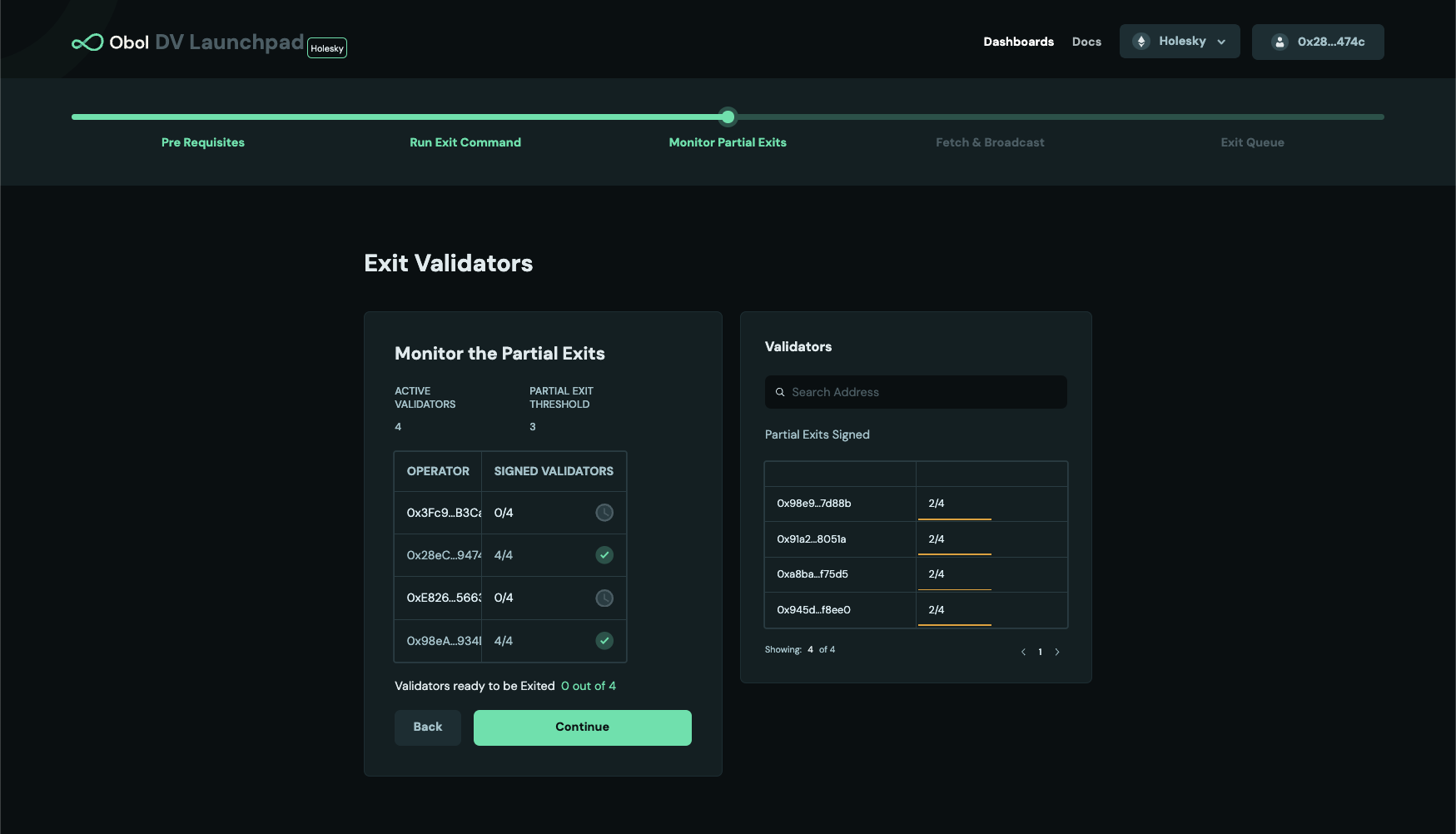
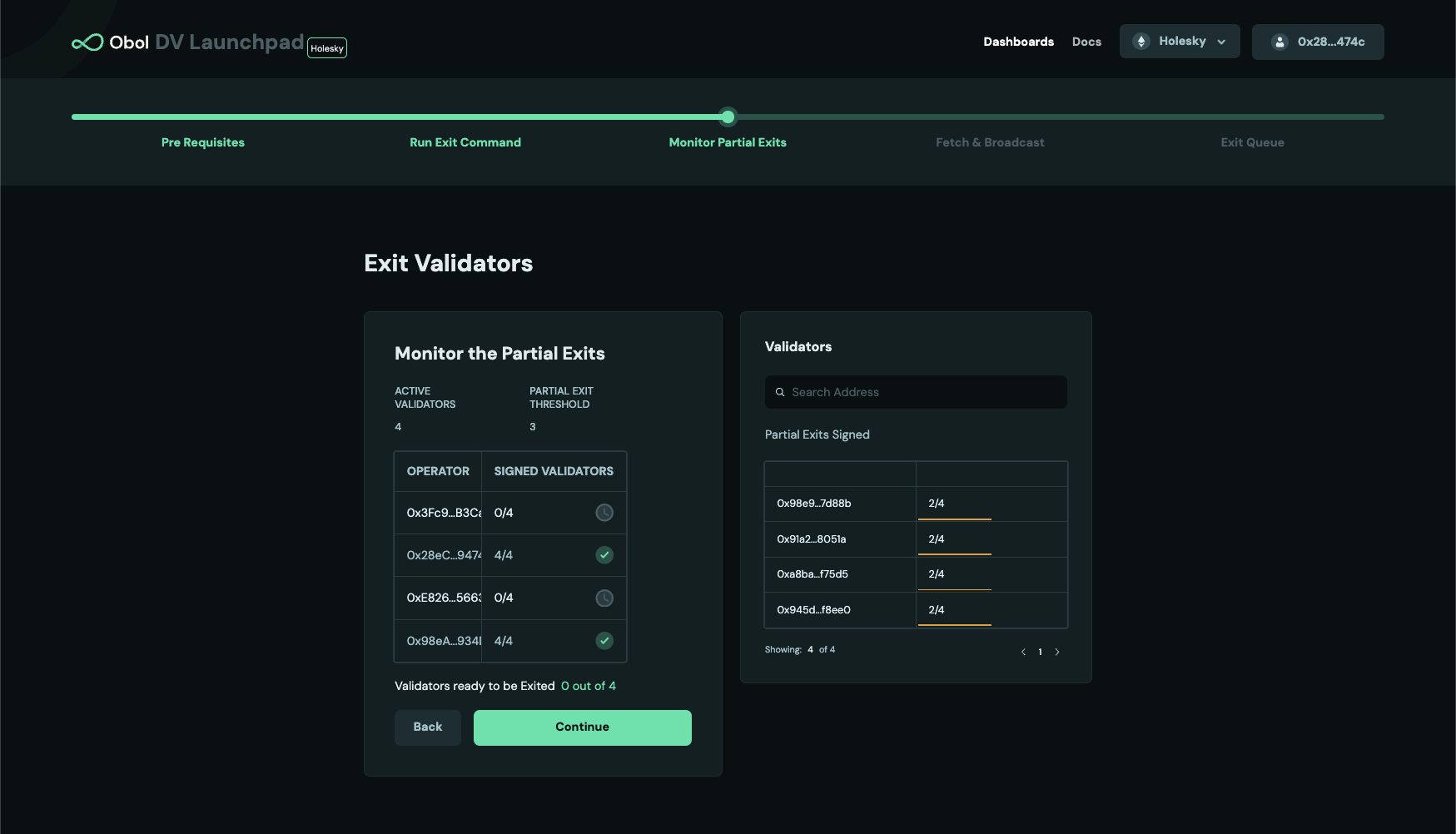
After a threshold of signed partial exits from node operators in the cluster is accumulated, a full (complete) exit can be created. For example, in the cluster below, only 2 out of 4 clusters have reached the threshold. Operators will have to wait for one more partial exit signature, either from operator 1 or 3 to create a full exit message.
Step 3: Broadcast the full exit
Once the partial exit threshold is reached, a full exit can be broadcasted from any of the operators. There are two options to do it, depending on your use-case
- Fetch the full exit and broadcast instantaneously (Broadcast directly) - users can choose it for a single validator or all validators in the cluster.
- Fetch the full exit and broadcast it later(Fetch & Broadcast later) - users can choose it for a single validator or all validators in the cluster.
- Broadcast directly
- Fetch & Broadcast later
- Single Validator
- All Validators
Following command fetches full exit and broadcasts it instantaneously for a specific validator.
docker exec -it charon-distributed-validator-node-charon-1 /bin/sh -c 'charon exit broadcast \
--beacon-node-endpoints="http://lighthouse:5052" \
--validator-public-key="<VALIDATOR_PUBLIC_KEY>"'
Once a validator has broadcasted an exit message, it must continue to validate for at least 27 hours or longer. Do not shut off your distributed validator nodes until your validator is fully exited.
Following command fetches full exits and broadcasts them instantaneously for all the validators that have reached a partial exit threshold.
docker exec -it charon-distributed-validator-node-charon-1 /bin/sh -c 'charon exit broadcast \
--beacon-node-endpoints="http://lighthouse:5052" \
--all'
Once a validator has broadcasted an exit message, it must continue to validate for at least 27 hours or longer. Do not shut off your distributed validator nodes until your validator is fully exited.
- Single Validator
- All Validators
Download Exits : The following command downloads the full exit signature for a specific public key and stores it in a file.
docker exec -it charon-distributed-validator-node-charon-1 /bin/sh -c 'charon exit fetch \
--beacon-node-endpoints="http://lighthouse:5052" \
--validator-public-key="<VALIDATOR_PUBLIC_KEY>" \
--fetched-exit-path="/opt/charon/.charon"'
Broadcast Exits : The following command uses the full exit signature for a specific public key from the file and broadcasts it to the network. The <FILENAME> is exit-<VALIDATOR_PUBLIC_KEY>.json, as written by the fetch command. Do not rename the file: the validator public key is read from the file name.
docker exec -it charon-distributed-validator-node-charon-1 /bin/sh -c 'charon exit broadcast \
--beacon-node-endpoints="http://lighthouse:5052" \
--validator-public-key="<VALIDATOR_PUBLIC_KEY>" \
--exit-from-file="/opt/charon/.charon/<FILENAME>"'
Once a validator has broadcasted an exit message, it must continue to validate for at least 27 hours or longer. Do not shut off your distributed validator nodes until your validator is fully exited.
Download Exits : The following command downloads the full exit signature for all the active public keys and stores it in a directory.
docker exec -it charon-distributed-validator-node-charon-1 /bin/sh -c 'charon exit fetch \
--beacon-node-endpoints="http://lighthouse:5052" \
--all \
--fetched-exit-path="/opt/charon/.charon"'
Broadcast Exits : The following command uses the full exit signatures from the directory and broadcasts it to the network.
docker exec -it charon-distributed-validator-node-charon-1 /bin/sh -c 'charon exit broadcast \
--all \
--beacon-node-endpoints="http://lighthouse:5052" \
--exit-from-dir="/opt/charon/.charon"'
Once a validator has broadcasted an exit message, it must continue to validate for at least 27 hours or longer. Do not shut off your distributed validator nodes until your validator is fully exited.
Step 1: Submit partial exit
- Single Validator
- All Validators
Following command signs a partial exit for a specific validator pubkey and broadcasts it instantaneously as soon as full exit can be created.
docker exec -it charon-distributed-validator-node-teku-1 /opt/teku/bin/teku voluntary-exit \
--beacon-node-api-endpoint="http://charon:3600/" \
--validator-public-keys=<PARTIAL_PUBLIC_KEY> \
--network=hoodi \
--epoch=256 \
--confirmation-enabled=false
Replace <PARTIAL_PUBLIC_KEY> with the partial pubkey found in the keystores in .charon/validator_keys/, under pubkey field. To which full pubkey a partial pubkey corresponds (as visible in Ethereum), can be looked up in the .charon/cluster-lock.json, under distributed_validators field.
Following command signs partial exits for all validator pubkeys and broadcast them instantaneously as soon as a full exit can be created.
docker exec -it charon-distributed-validator-node-teku-1 /opt/teku/bin/teku voluntary-exit \
--beacon-node-api-endpoint="http://charon:3600/" \
--validator-keys="/opt/charon/validator_keys:/opt/charon/validator_keys" \
--network=hoodi \
--epoch=256 \
--confirmation-enabled=false
Step 2: Monitor partial exit for all active validators
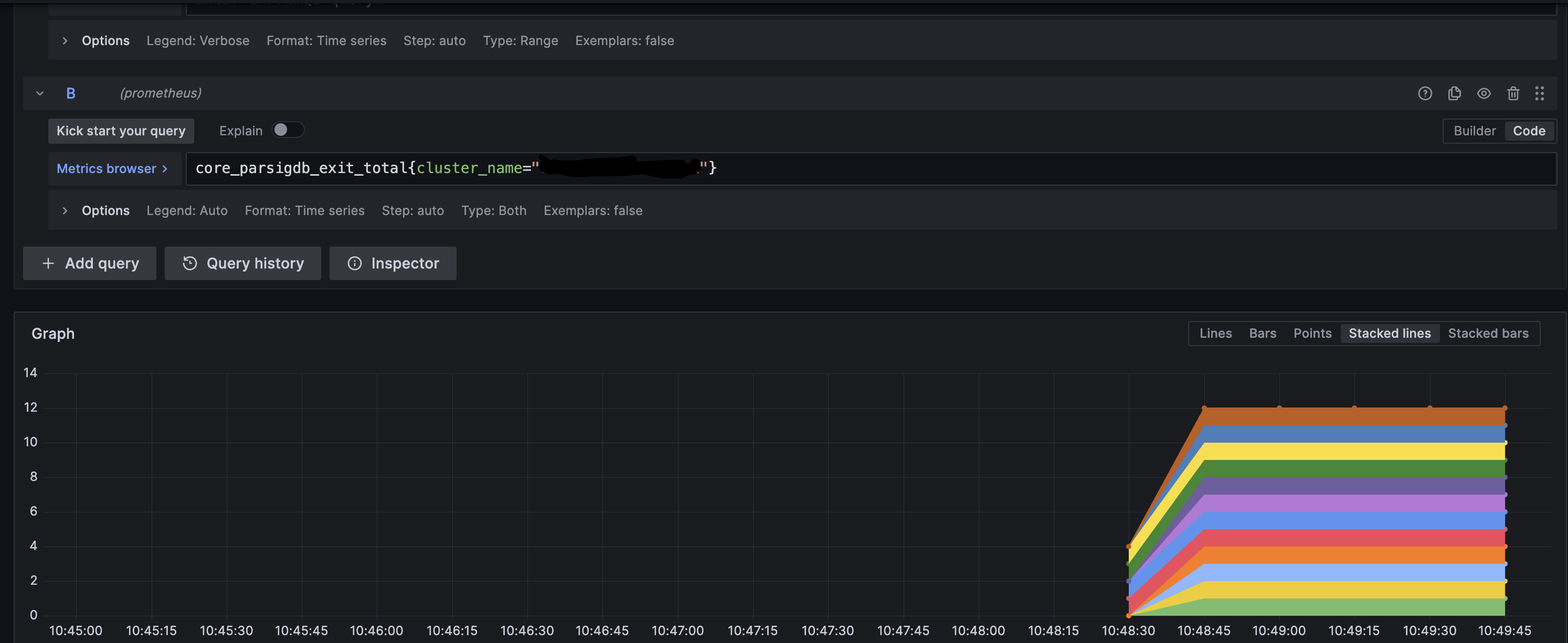
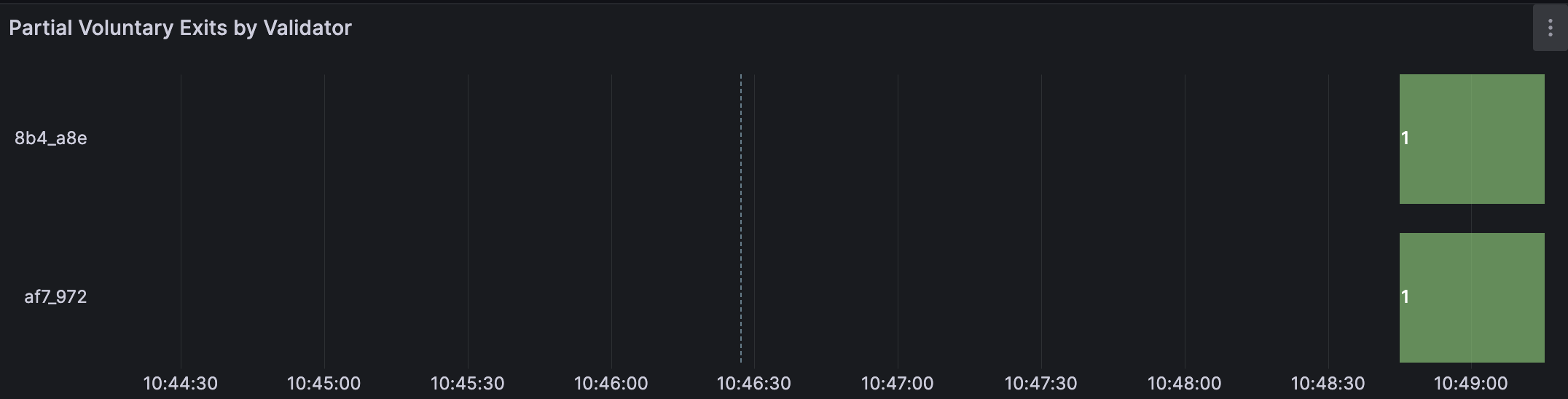
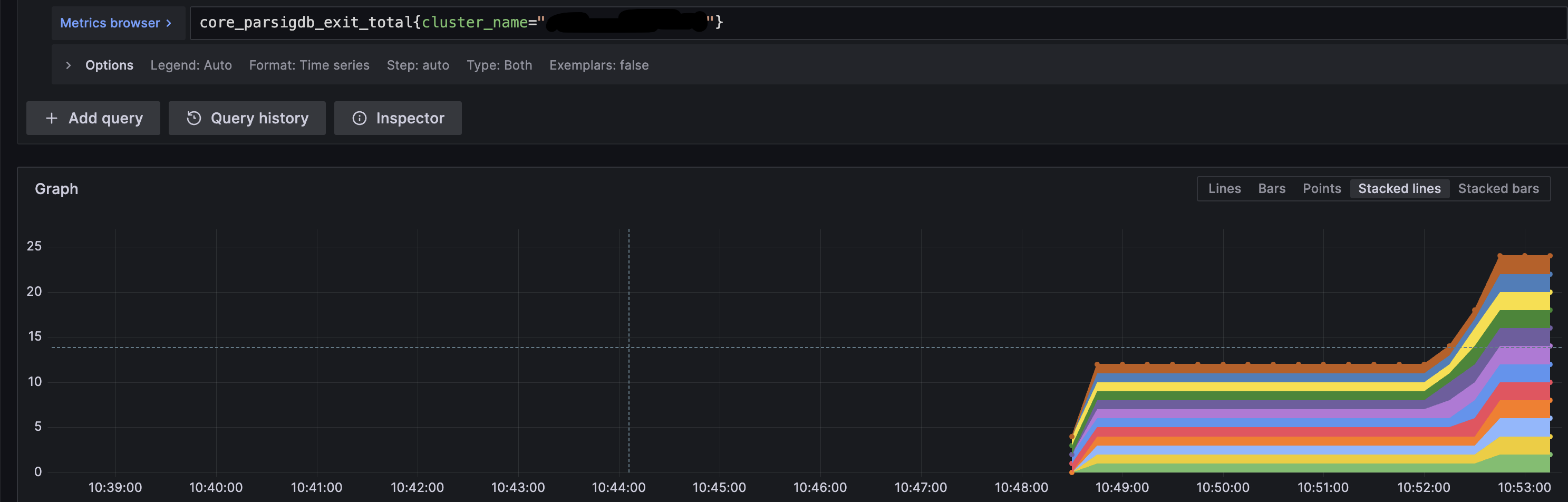
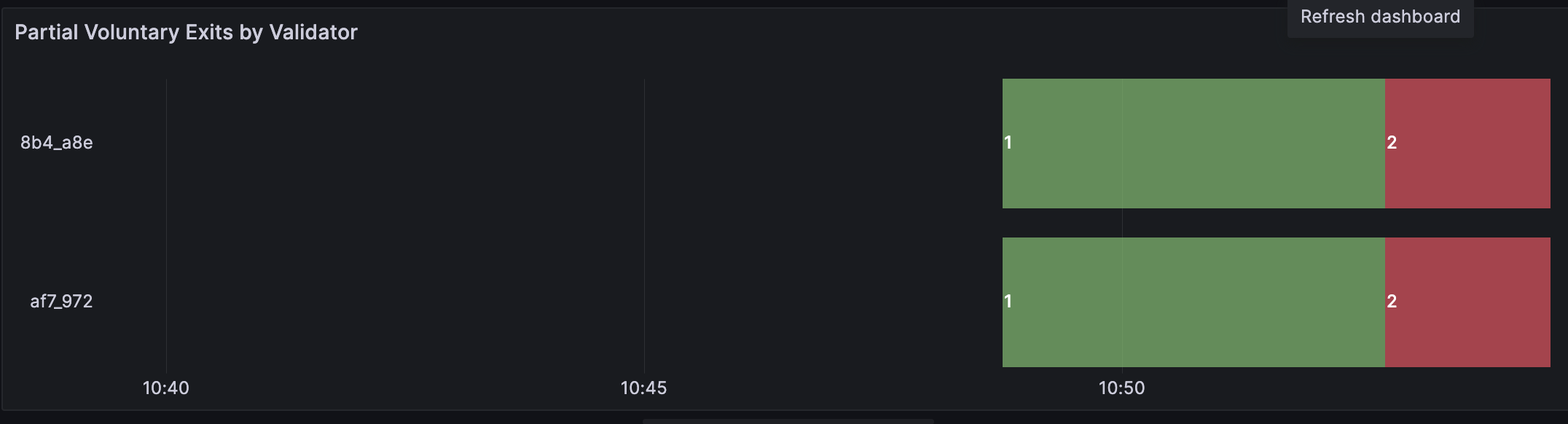
Consult the examples below and compare them to your validator's monitoring to verify that exits from each operator in the cluster are being received. This example is a cluster of 4 nodes with 2 validators and threshold of 3 nodes broadcasting exits are needed.
-
Operator 1 broadcasts an exit on validator client 1.
-
Operator 2 broadcasts an exit on validator client 2.
-
Operator 3 broadcasts an exit on validator client 3.
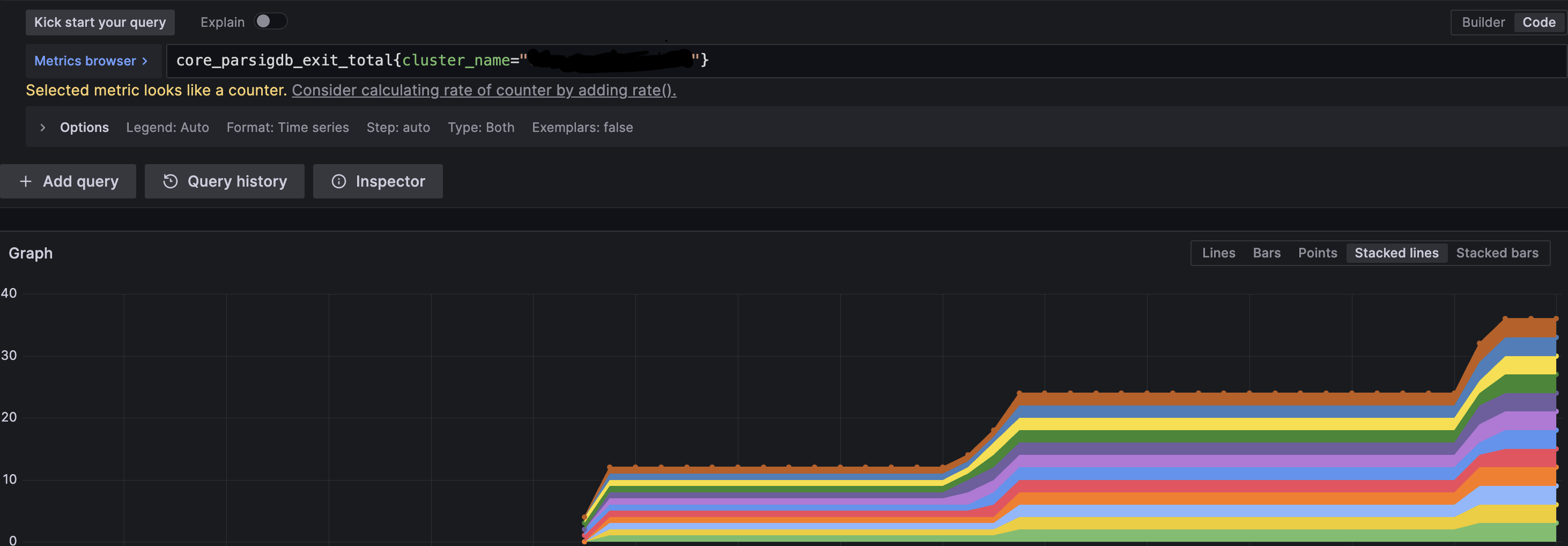
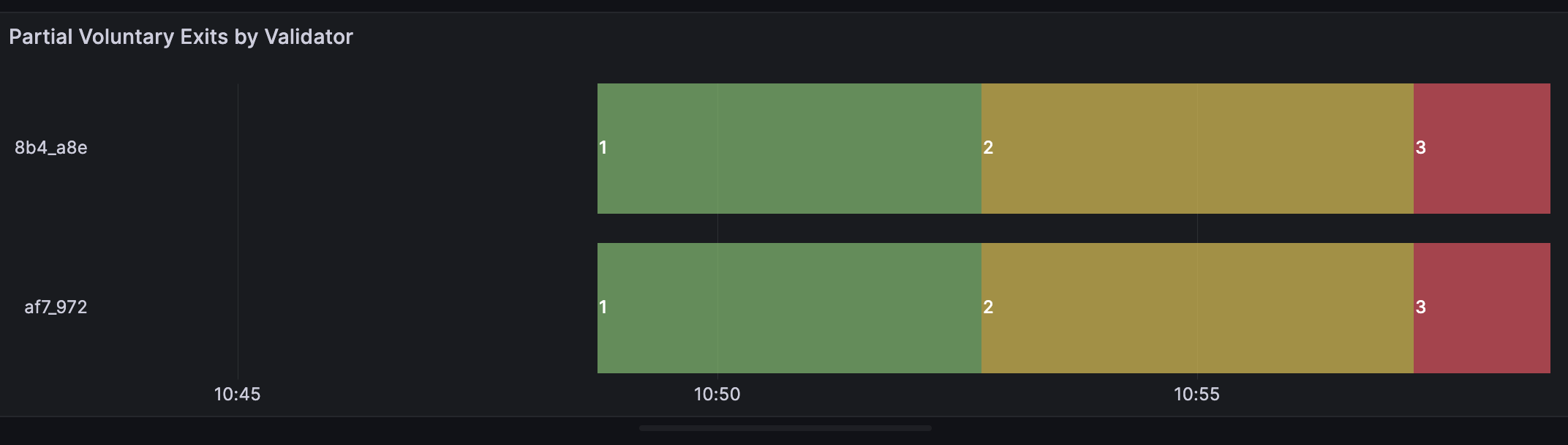
At this point, the threshold of 3 has been reached and the validator exit process will start. The logs will show the following:

Once a validator has broadcasted an exit message, it must continue to validate for at least 27 hours or longer. Do not shut off your distributed validator nodes until your validator is fully exited.
Step 1: Submit partial exit
- Single Validator
- All Validators
Following command signs a partial exit for a specific validator pubkey and broadcasts it instantaneously as soon as full exit can be created. It copies all files and directories from the keystore path /home/user/data/charon to the newly created /home/user/data/wd directory. The directory referenced here as /home/user/data/node0/ is the data directory specified on start of Nimbus. As an example in CDVC the /home/user/data/node2/ and /home/user/data/node5/ are used.
docker exec -it charon-distributed-validator-node-nimbus-1 /bin/bash -c "\
mkdir -p /home/user/data/wd; \
cp -r /home/user/data/node0/ /home/user/data/wd/; \
cat /home/user/data/wd/node0/secrets/<PARTIAL_PUBLIC_KEY> | /home/user/nimbus_beacon_node deposits exit \
    --rest-url=http://charon:3600/ \
    --validator=/home/user/data/wd/node0/validators/<PARTIAL_PUBLIC_KEY>/keystore.json \
    --epoch=256 \
    --data-dir=/home/user/data/wd/node0/;"
Replace <PARTIAL_PUBLIC_KEY> with the partial pubkey found in the keystores in .charon/validator_keys/, under pubkey field. To which full pubkey a partial pubkey corresponds (as visible in Ethereum), can be looked up in the .charon/cluster-lock.json, under distributed_validators field.
Following command executes an interactive command inside the Nimbus VC container. It copies all files and directories from the keystore path /home/user/data/charon to the newly created /home/user/data/wd directory. The directory referenced here as /home/user/data/node0/ is the data directory specified on start of Nimbus. As an example in CDVC the /home/user/data/node2/ and /home/user/data/node5/ are used.
docker exec -it charon-distributed-validator-node-nimbus-1 /bin/bash -c "\
mkdir -p /home/user/data/wd; \
cp -r /home/user/data/node0/ /home/user/data/wd/; \
/home/user/nimbus_beacon_node deposits exit \
    --rest-url=http://charon:3600/ \
    --all \
    --epoch=256 \
    --data-dir=/home/user/data/wd/node0/;"
Step 2: Monitor partial exit for all active validators
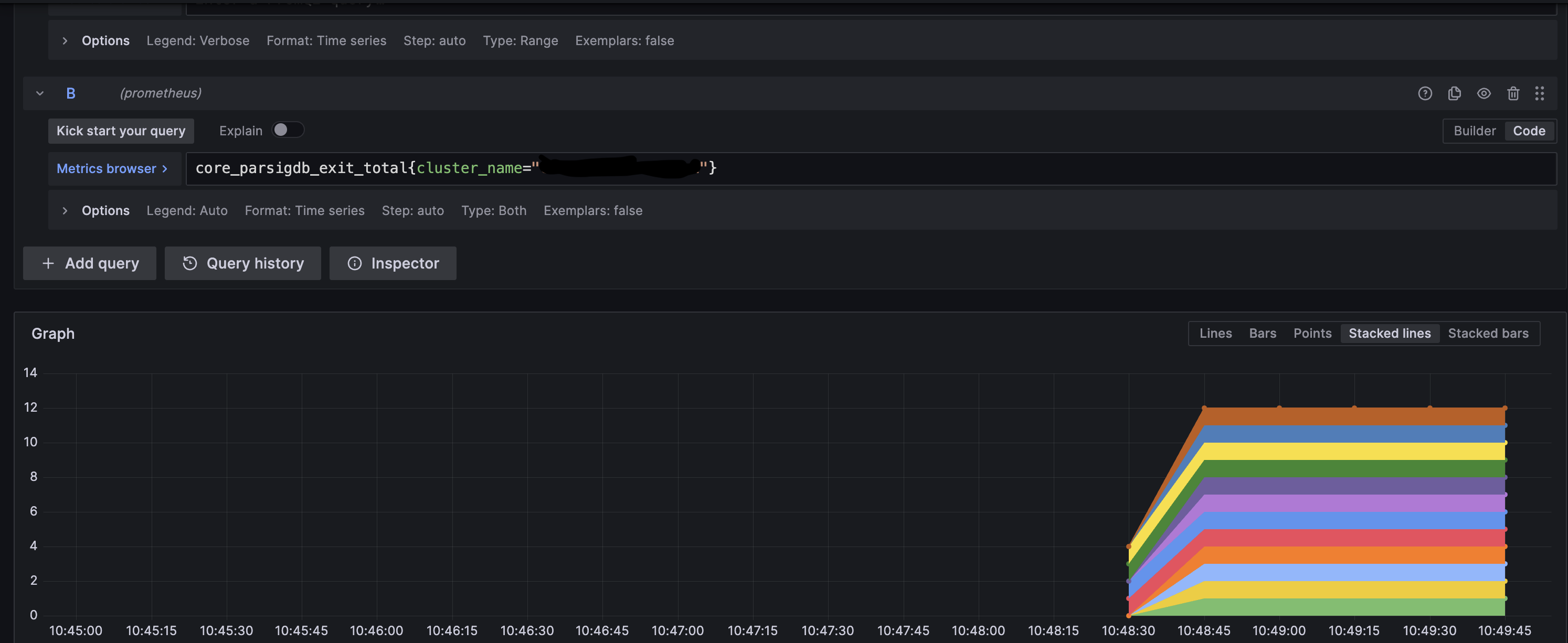
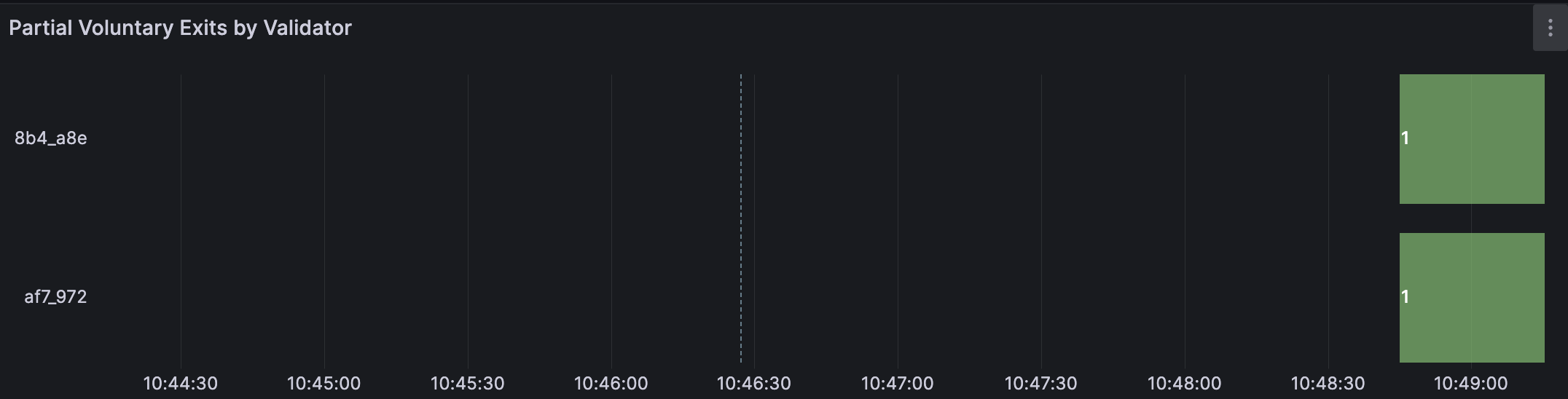
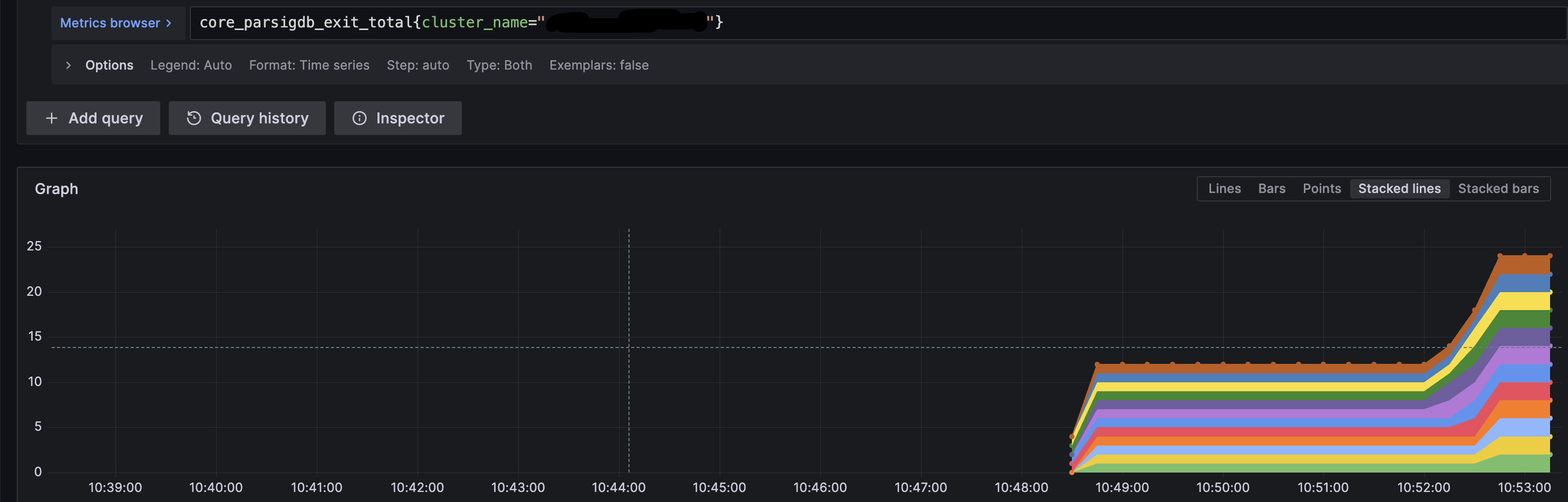
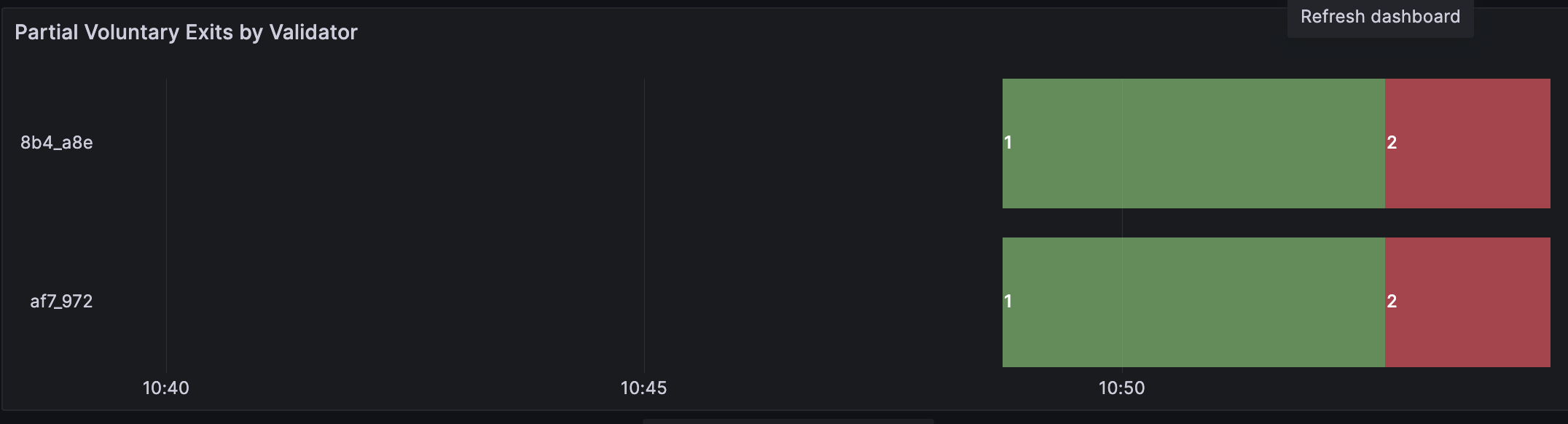
Consult the examples below and compare them to your validator's monitoring to verify that exits from each operator in the cluster are being received. This example is a cluster of 4 nodes with 2 validators and threshold of 3 nodes broadcasting exits are needed.
-
Operator 1 broadcasts an exit on validator client 1.
-
Operator 2 broadcasts an exit on validator client 2.
-
Operator 3 broadcasts an exit on validator client 3.
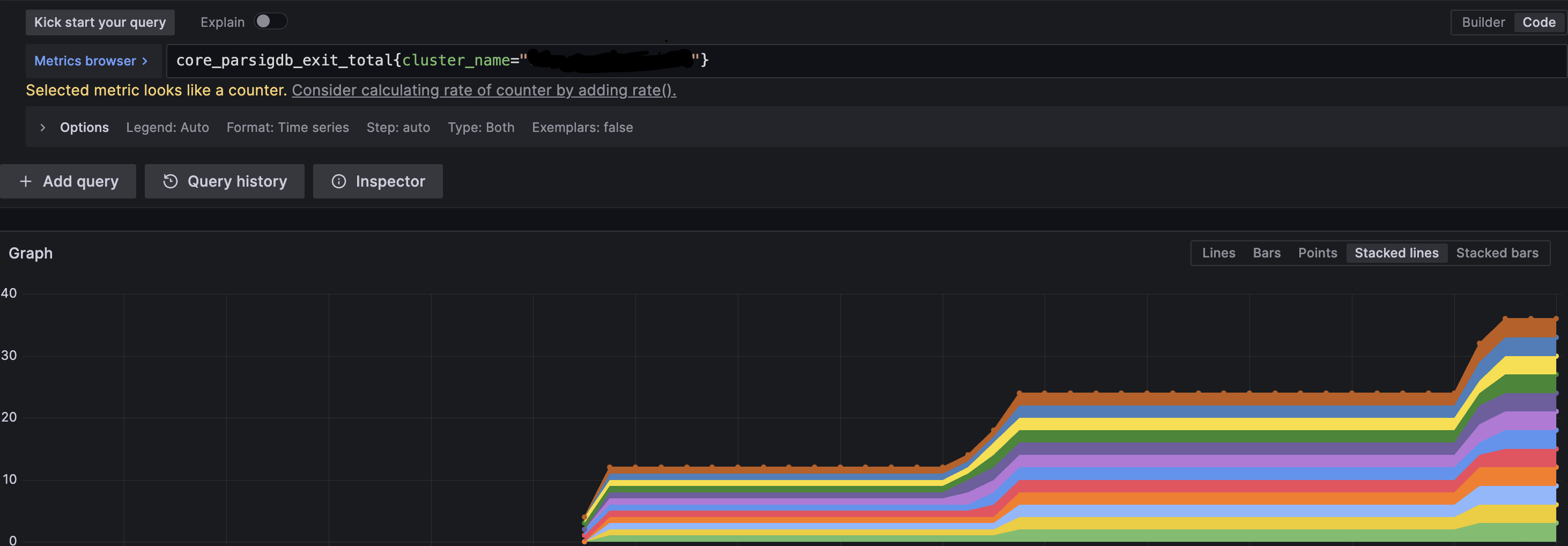
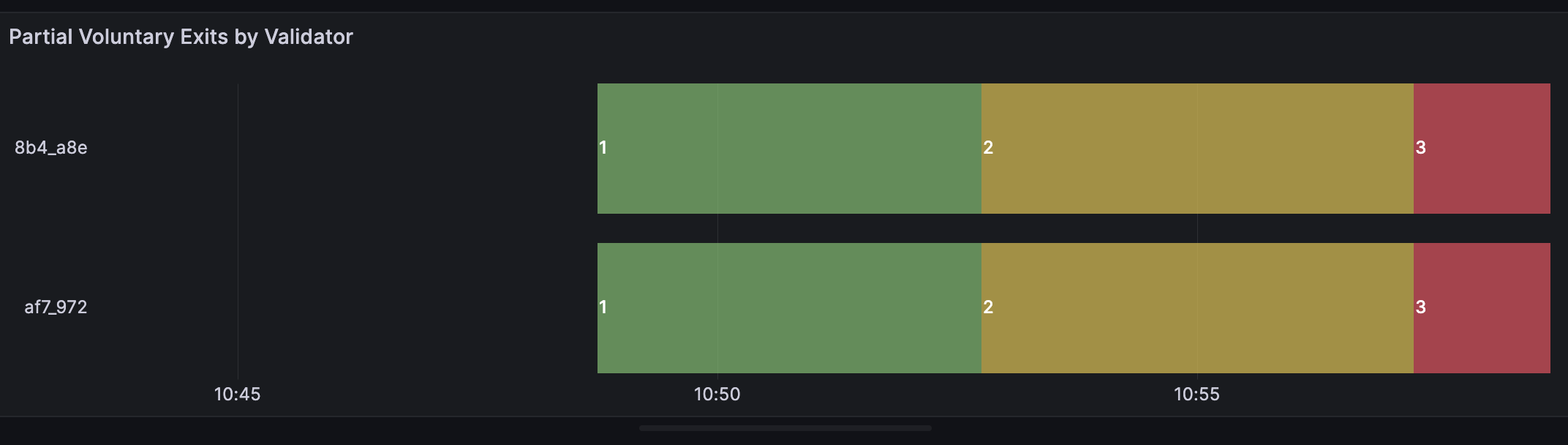
At this point, the threshold of 3 has been reached and the validator exit process will start. The logs will show the following:

Once a validator has broadcasted an exit message, it must continue to validate for at least 27 hours or longer. Do not shut off your distributed validator nodes until your validator is fully exited.
Step 2: Monitor partial exit for all active validators
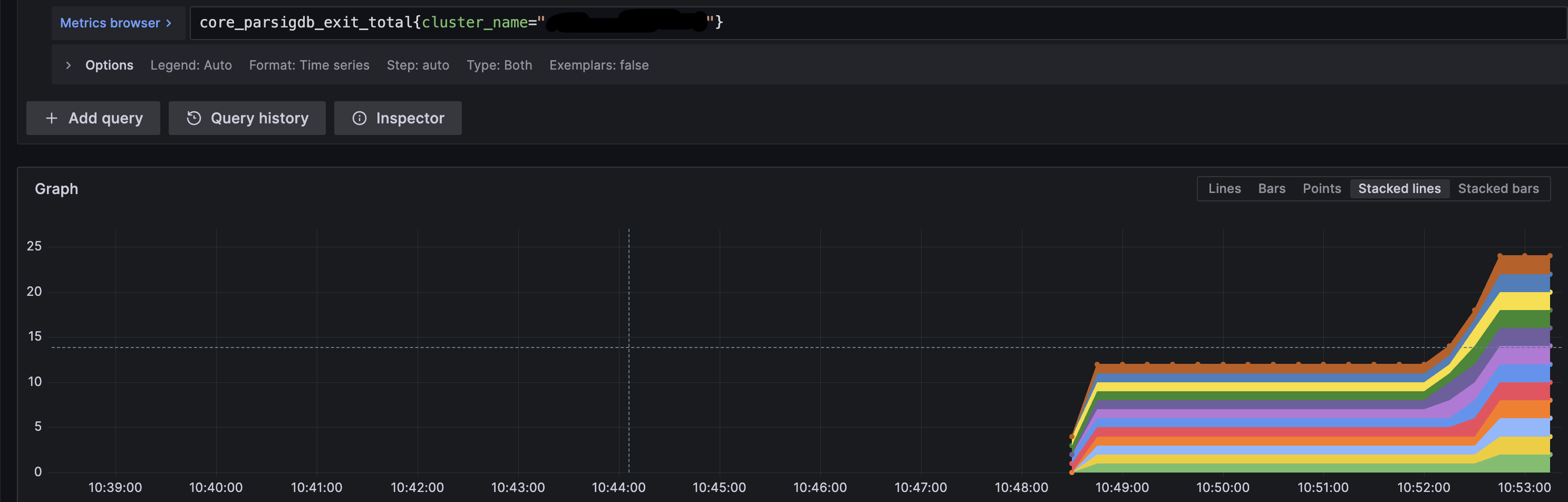
Consult the examples below and compare them to your validator's monitoring to verify that exits from each operator in the cluster are being received. This example is a cluster of 4 nodes with 2 validators and threshold of 3 nodes broadcasting exits are needed.
-
Operator 1 broadcasts an exit on validator client 1.
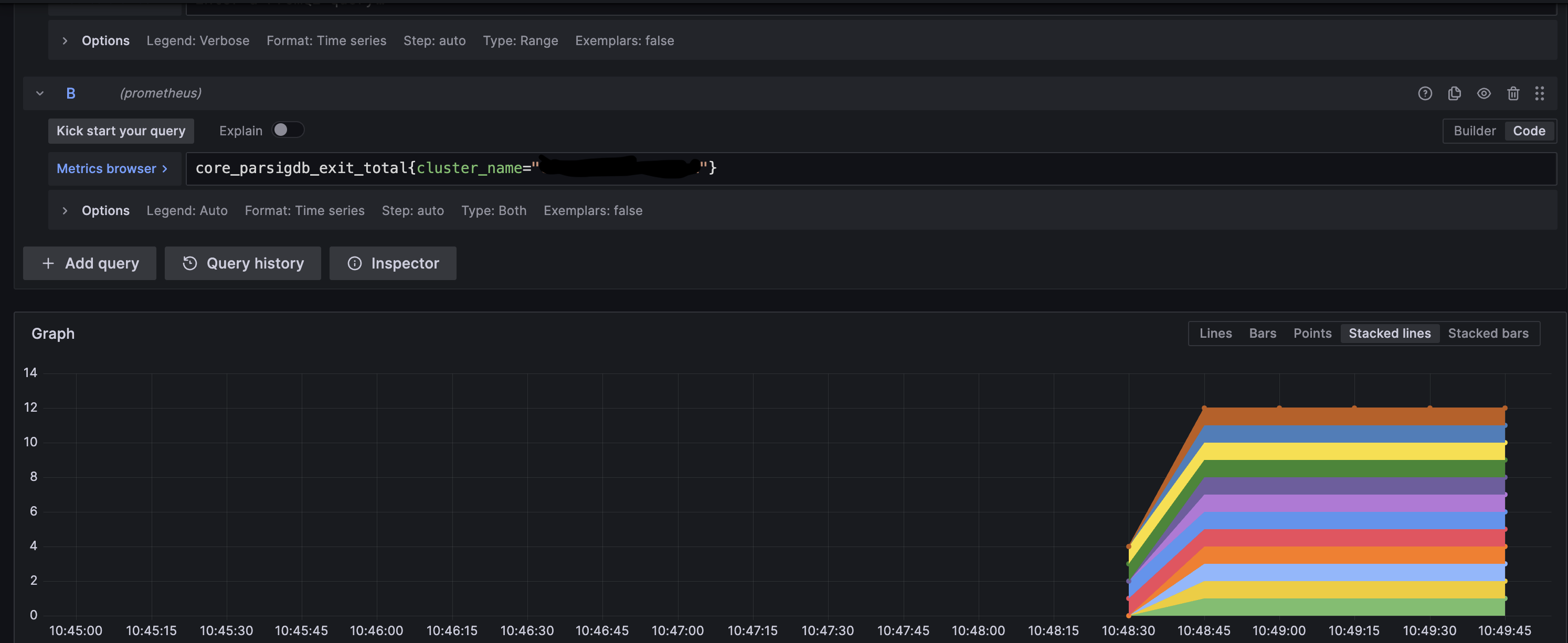
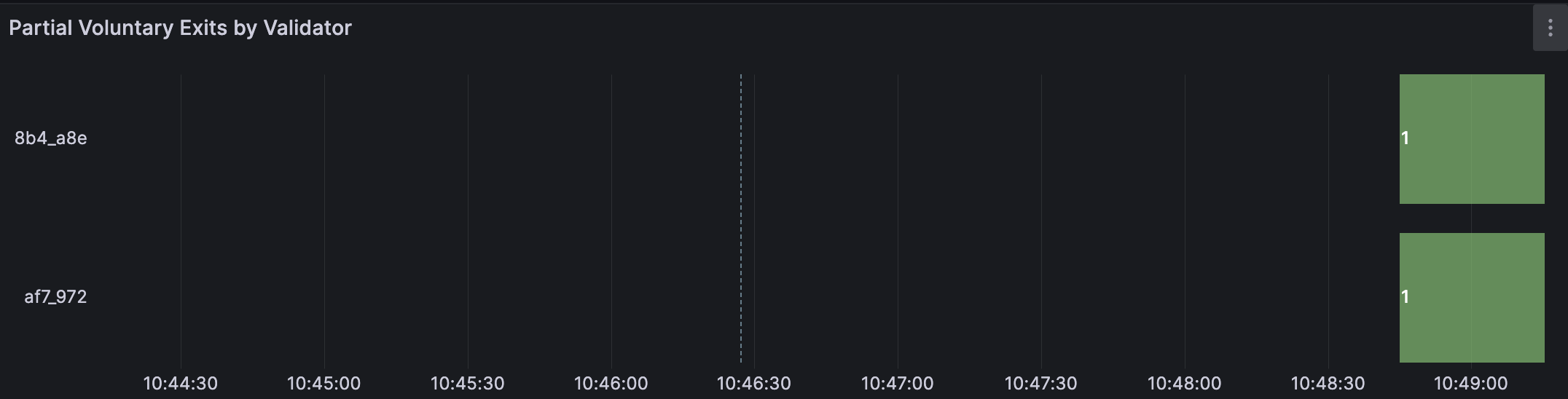
-
Operator 2 broadcasts an exit on validator client 2.
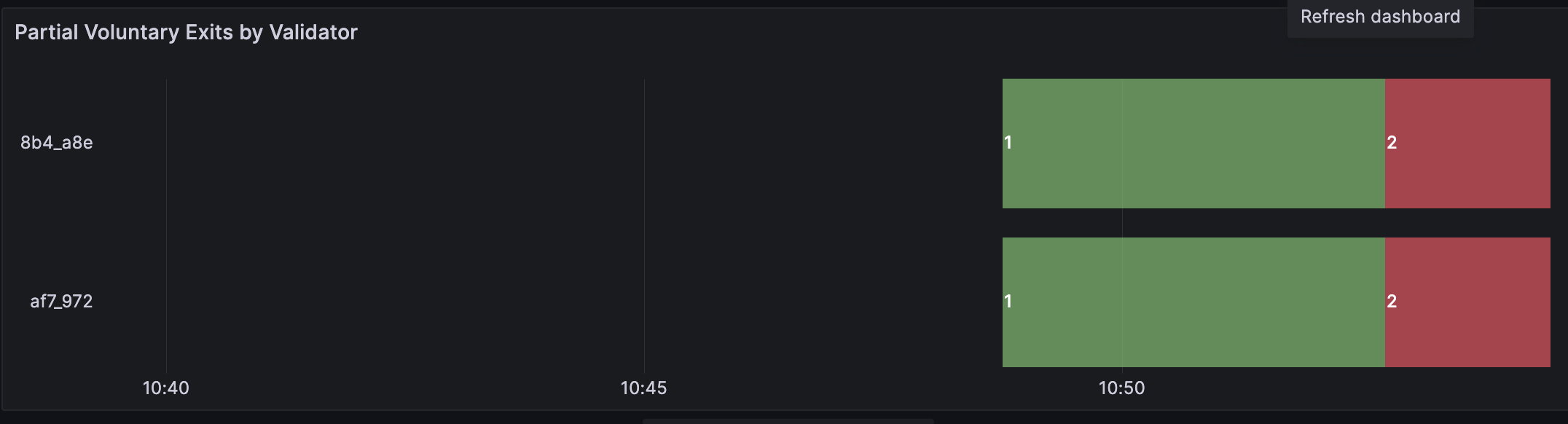
-
Operator 3 broadcasts an exit on validator client 3.
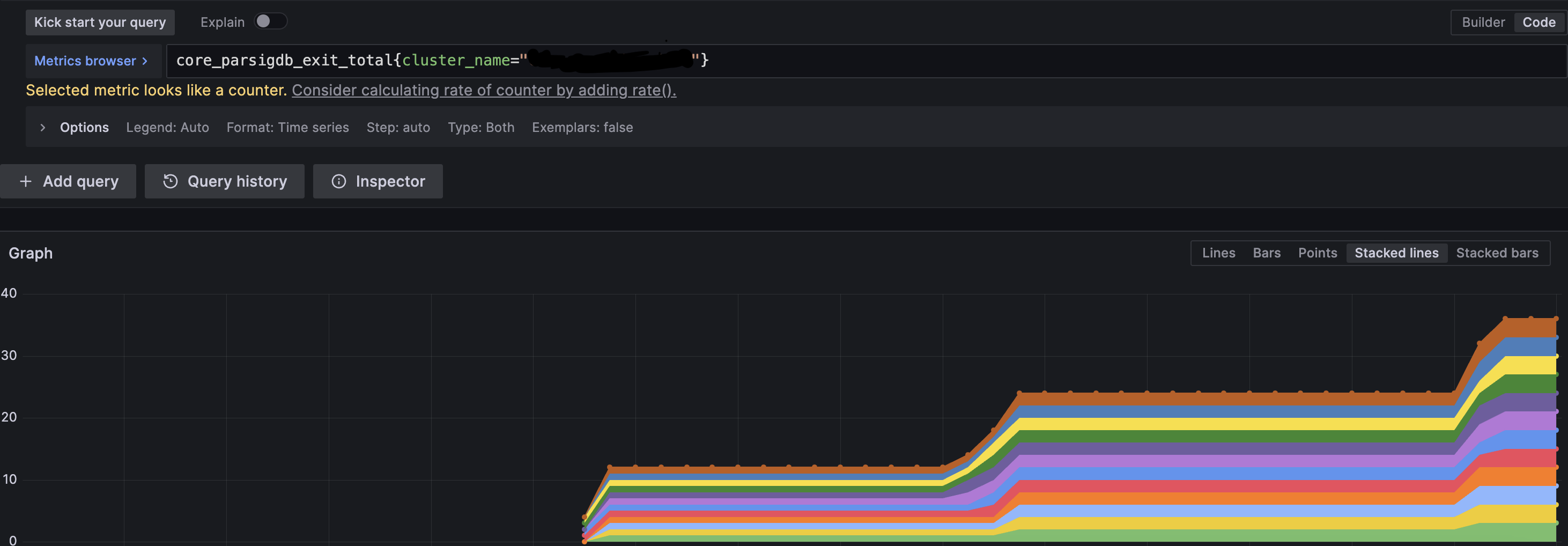
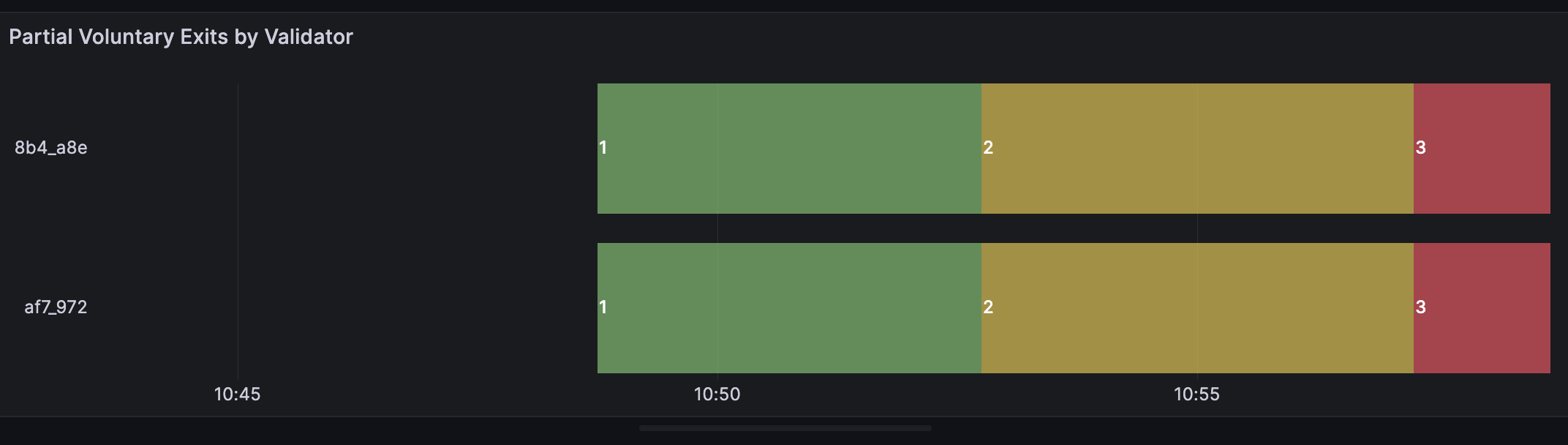
At this point, the threshold of 3 has been reached and the validator exit process will start. The logs will show the following:

Once a validator has broadcasted an exit message, it must continue to validate for at least 27 hours or longer. Do not shut off your distributed validator nodes until your validator is fully exited.
Step 1: Submit partial exit
- Single Validator
- All Validators
Following command signs a partial exit for a specific validator pubkey and broadcasts it instantaneously as soon as full exit can be created.
docker exec -it charon-distributed-validator-node-lodestar-1 node /usr/app/packages/cli/bin/lodestar validator voluntary-exit \
--beaconNodes="http://charon:3600" \
--pubkeys=<PARTIAL_PUBLIC_KEY> \
--network=hoodi \
--exitEpoch=256 \
--dataDir=/opt/data \
--yes
Replace <PARTIAL_PUBLIC_KEY> with the partial pubkey found in the keystores in .charon/validator_keys/, under pubkey field. To which full pubkey a partial pubkey corresponds (as visible in Ethereum), can be looked up in the .charon/cluster-lock.json, under distributed_validators field.
Following command signs partial exits for all validator pubkeys and broadcast them instantaneously as soon as a full exit can be created.
docker exec -it charon-distributed-validator-node-lodestar-1 node /usr/app/packages/cli/bin/lodestar validator voluntary-exit \
--beaconNodes="http://charon:3600" \
--network=hoodi \
--exitEpoch=256 \
--dataDir=/opt/data \
--yes
Step 2: Monitor partial exit for all active validators
Consult the examples below and compare them to your validator's monitoring to verify that exits from each operator in the cluster are being received. This example is a cluster of 4 nodes with 2 validators and threshold of 3 nodes broadcasting exits are needed.
-
Operator 1 broadcasts an exit on validator client 1.
-
Operator 2 broadcasts an exit on validator client 2.
-
Operator 3 broadcasts an exit on validator client 3.
At this point, the threshold of 3 has been reached and the validator exit process will start. The logs will show the following:
Once a validator has broadcasted an exit message, it must continue to validate for at least 27 hours or longer. Do not shut off your distributed validator nodes until your validator is fully exited.
Step 1: Submit partial exit
Lighthouse VC cannot perform an exit for custom epoch and always uses the current one. This means you should coordinate your efforts between cluster peers, in order to sign the same payload. If you sign exit messages in different epochs, signatures will not be aggregated as they will mismatch and new signing of exit messages needs to be done.
- Single Validator
- All Validators
Following command signs a partial exit for a specific validator pubkey and broadcasts it instantaneously as soon as full exit can be created.
docker exec -it charon-distributed-validator-node-lighthouse-1 /bin/bash -c '\
file="/opt/charon/keys/keystore-<N>.json"; \
filename=$(basename $file);
keystore=${filename%.*};
lighthouse account validator exit \
    --beacon-node http://charon:3600 \
    --keystore /opt/charon/keys/$keystore.json \
    --network hoodi \
    --password-file /opt/charon/keys/$keystore.txt \
    --no-confirmation \
    --no-wait;'
Replace <N> with the keystore index. Keystore indices can be found in .charon/validator_keys/. Each JSON file has a pubkey field corresponding to the partial pubkey. To which full pubkey this partial pubkey corresponds (as visible in Ethereum), can be looked up in the .charon/cluster-lock.json, under distributed_validators field.
Following command executes an interactive command inside the Lighthouse VC container.
docker exec -it charon-distributed-validator-node-lighthouse-1 /bin/bash -c '\
for file in /opt/charon/keys/*; do \
    filename=$(basename $file);
    if [[ $filename == *".json"* ]]; then
        keystore=${filename%.*};
        lighthouse account validator exit \
            --beacon-node http://charon:3600 \
            --keystore /opt/charon/keys/$keystore.json \
            --network hoodi \
            --password-file /opt/charon/keys/$keystore.txt \
            --no-confirmation \
            --no-wait;
        fi;
done;'
Step 2: Monitor partial exit for all active validators
Consult the examples below and compare them to your validator's monitoring to verify that exits from each operator in the cluster are being received. This example is a cluster of 4 nodes with 2 validators and threshold of 3 nodes broadcasting exits are needed.
-
Operator 1 broadcasts an exit on validator client 1.
-
Operator 2 broadcasts an exit on validator client 2.
-
Operator 3 broadcasts an exit on validator client 3.
At this point, the threshold of 3 has been reached and the validator exit process will start. The logs will show the following:
Once a validator has broadcasted an exit message, it must continue to validate for at least 27 hours or longer. Do not shut off your distributed validator nodes until your validator is fully exited.
Currently voluntary exits through Prysm are not supported. This is because Prysm support voluntary exits only if both the validator client and the beacon node are running on Prysm. Note that this is incompatible with Charon, as the Charon client intercepts the communication between the validator client and the consensus layer.
Once a validator has broadcasted an exit message, it must continue to validate for at least 27 hours or longer. Do not shut off your distributed validator nodes until your validator is fully exited.
Exit a distributed validator using DappNode
-
Navigate to the config tab of your Obol DappNode package. Click 'Packages', then click 'My Packages', and enter the Obol package. Go to the config tab. At the bottom right corner of the page, click on 'Show Advanced Editor'.
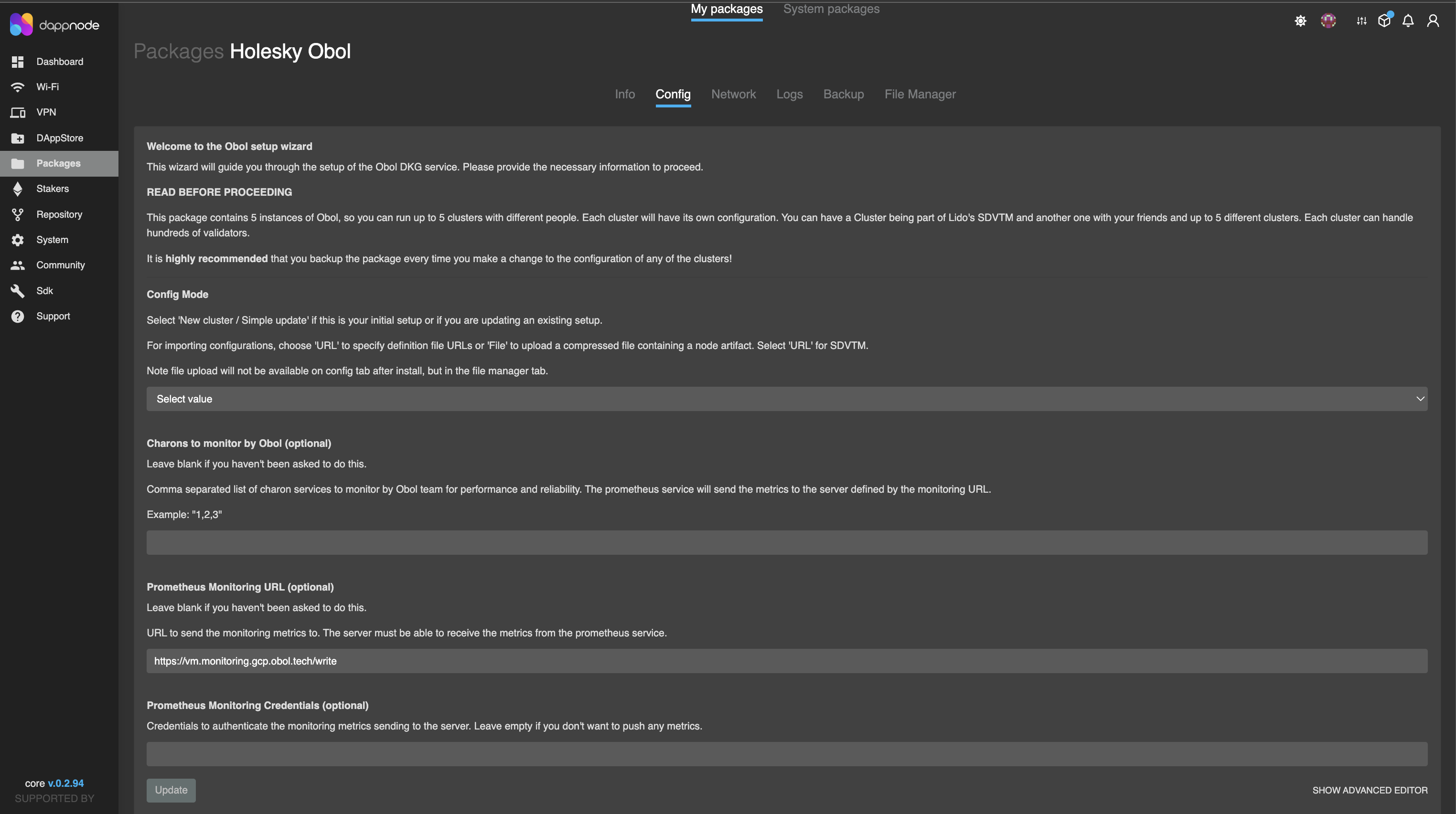
-
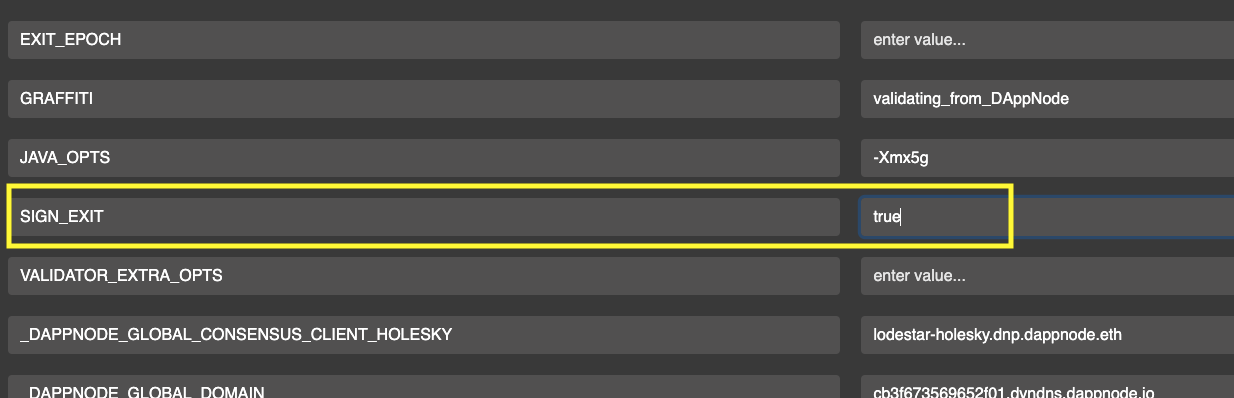
The advanced editor config page provides ENV configs for each validator. Scroll to the validator number you want to exit and type “true” in the column opposite SIGN_EXIT.
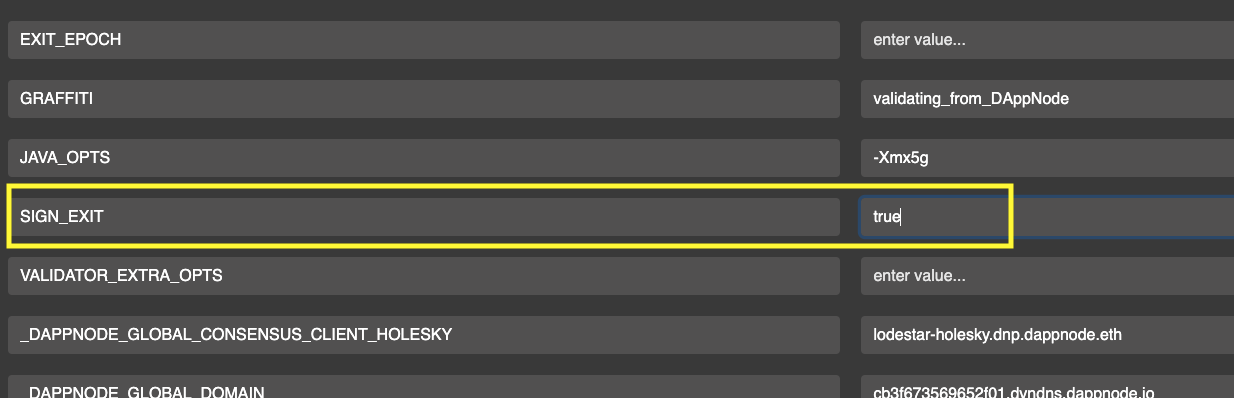
-
Scroll to the bottom of the page and click the 'update' button for the changes to take effect.

-
Check your logs to confirm the exit process has started.
Once a validator has broadcasted an exit message, it must continue to validate for at least 27 hours or longer. Do not shut off your distributed validator nodes until your validator is fully exited.
- Charon
- Teku
- Nimbus
- Lodestar
- Lighthouse
- Prysm
- DappNode
Voluntary exit can be submitted directly through Charon. This approach is validator client agnostic as Charon abstracts validator client's native exit commands underneath.
Step 1: Submit partial exit
- Single Validator
- All Validators
Following command signs a partial exit for a specific validator pubkey.
docker exec -it charon-distributed-validator-node-charon-1 /bin/sh -c 'charon exit sign \
--beacon-node-endpoints="http://lighthouse:5052" \
--validator-public-key="<VALIDATOR_PUBLIC_KEY>" \
--exit-epoch=194048'
Replace <VALIDATOR_PUBLIC_KEY> with the validator's full pubkey (as visible in Ethereum).
Following command signs partial exits for all validators.
docker exec -it charon-distributed-validator-node-charon-1 /bin/sh -c 'charon exit sign \
--beacon-node-endpoints="http://lighthouse:5052" \
--all \
--exit-epoch=194048'
Step 2: Monitor the Partial Exits' status
After a threshold of signed partial exits from node operators in the cluster is accumulated, a full (complete) exit can be created. For example, in the cluster below, only 2 out of 4 clusters have reached the threshold. Operators will have to wait for one more partial exit signature, either from operator 1 or 3 to create a full exit message.
Step 3: Broadcast the full exit
Once the partial exit threshold is reached, a full exit can be broadcasted from any of the operator. There are two options to do it, depending on your use-case
- Fetch the full exit and broadcast instantaneously (Broadcast directly ) - users can choose it for a single validator or all validators in the cluster.
- Fetch the full exit and broadcast it later(Fetch & Broadcast later ) - users can choose it for a single validator or all validators in the cluster.
- Broadcast Directly
- Fetch & Broadcast
- Single Validator
- All Validators
Following command fetches full exit and broadcasts it instantaneously for a specific validator.
docker exec -it charon-distributed-validator-node-charon-1 /bin/sh -c 'charon exit broadcast \
--beacon-node-endpoints="http://lighthouse:5052" \
--validator-public-key="<VALIDATOR_PUBLIC_KEY>"'
Once a validator has broadcasted an exit message, it must continue to validate for at least 27 hours or longer. Do not shut off your distributed validator nodes until your validator is fully exited.
Following command fetches full exits and broadcasts them instantaneously for all the validators that have reached a partial exit threshold.
docker exec -it charon-distributed-validator-node-charon-1 /bin/sh -c 'charon exit broadcast \
--beacon-node-endpoints="http://lighthouse:5052" \
--all'
Once a validator has broadcasted an exit message, it must continue to validate for at least 27 hours or longer. Do not shut off your distributed validator nodes until your validator is fully exited.
- Single Validator
- All Validators
Download Exits : The following command downloads the full exit signature for a specific public key and stores it in a file.
docker exec -it charon-distributed-validator-node-charon-1 /bin/sh -c 'charon exit fetch \
--beacon-node-endpoints="http://lighthouse:5052" \
--validator-public-key="<VALIDATOR_PUBLIC_KEY>" \
--fetched-exit-path="/opt/charon/.charon"'
Broadcast Exits : The following command uses the full exit signature for a specific public key from the file and broadcasts it to the network. The <FILENAME> is exit-<VALIDATOR_PUBLIC_KEY>.json, as written by the fetch command. Do not rename the file: the validator public key is read from the file name.
docker exec -it charon-distributed-validator-node-charon-1 /bin/sh -c 'charon exit broadcast \
--beacon-node-endpoints="http://lighthouse:5052" \
--validator-public-key="<VALIDATOR_PUBLIC_KEY>" \
--exit-from-file="/opt/charon/.charon/<FILENAME>"'
Once a validator has broadcasted an exit message, it must continue to validate for at least 27 hours or longer. Do not shut off your distributed validator nodes until your validator is fully exited.
Download Exits : The following command downloads the full exit signature for all the active public keys and stores it in a directory.
docker exec -it charon-distributed-validator-node-charon-1 /bin/sh -c 'charon exit fetch \
--beacon-node-endpoints="http://lighthouse:5052" \
--all \
--fetched-exit-path="/opt/charon/.charon"'
Broadcast Exits : The following command uses the full exit signatures from the directory and broadcasts it to the network.
docker exec -it charon-distributed-validator-node-charon-1 /bin/sh -c 'charon exit broadcast \
--all \
--beacon-node-endpoints="http://lighthouse:5052" \
--exit-from-dir="/opt/charon/.charon"'
Once a validator has broadcasted an exit message, it must continue to validate for at least 27 hours or longer. Do not shut off your distributed validator nodes until your validator is fully exited.
Step 1: Submit partial exit
- Single Validator
- All Validators
Following command signs a partial exit for a specific validator pubkey and broadcasts it instantaneously as soon as full exit can be created.
docker exec -it charon-distributed-validator-node-teku-1 /opt/teku/bin/teku voluntary-exit \
--beacon-node-api-endpoint="http://charon:3600/" \
--validator-public-keys=<PARTIAL_PUBLIC_KEY> \
--network=mainnet \
--epoch=194048 \
--confirmation-enabled=false
Replace <PARTIAL_PUBLIC_KEY> with the partial pubkey found in the keystores in .charon/validator_keys/, under pubkey field. To which full pubkey a partial pubkey corresponds (as visible in Ethereum), can be looked up in the .charon/cluster-lock.json, under distributed_validators field.
Following command signs partial exits for all validator pubkeys and broadcast them instantaneously as soon as a full exit can be created.
docker exec -it charon-distributed-validator-node-teku-1 /opt/teku/bin/teku voluntary-exit \
--beacon-node-api-endpoint="http://charon:3600/" \
--validator-keys="/opt/charon/validator_keys:/opt/charon/validator_keys" \
--network=mainnet \
--epoch=194048 \
--confirmation-enabled=false
Step 2: Monitor partial exit for all active validators
Consult the examples below and compare them to your validator's monitoring to verify that exits from each operator in the cluster are being received. This example is a cluster of 4 nodes with 2 validators and threshold of 3 nodes broadcasting exits are needed.
-
Operator 1 broadcasts an exit on validator client 1.
-
Operator 2 broadcasts an exit on validator client 2.
-
Operator 3 broadcasts an exit on validator client 3.
At this point, the threshold of 3 has been reached and the validator exit process will start. The logs will show the following:
Once a validator has broadcasted an exit message, it must continue to validate for at least 27 hours or longer. Do not shut off your distributed validator nodes until your validator is fully exited.
Step 1: Submit partial exit
- Single Validator
- All Validators
Following command signs a partial exit for a specific validator pubkey and broadcasts it instantaneously as soon as full exit can be created. It copies all files and directories from the keystore path /home/user/data/charon to the newly created /home/user/data/wd directory. The directory referenced here as /home/user/data/node0/ is the data directory specified on start of Nimbus. As an example in CDVC the /home/user/data/node2/ and /home/user/data/node5/ are used.
docker exec -it charon-distributed-validator-node-nimbus-1 /bin/bash -c "\
mkdir -p /home/user/data/wd; \
cp -r /home/user/data/node0/ /home/user/data/wd/; \
cat /home/user/data/wd/node0/secrets/<PARTIAL_PUBLIC_KEY> | /home/user/nimbus_beacon_node deposits exit \
    --rest-url=http://charon:3600/ \
    --validator=/home/user/data/wd/node0/validators/<PARTIAL_PUBLIC_KEY>/keystore.json \
    --epoch=194048 \
    --data-dir=/home/user/data/wd/node0/;"
Replace <PARTIAL_PUBLIC_KEY> with the partial pubkey found in the keystores in .charon/validator_keys/, under pubkey field. To which full pubkey a partial pubkey corresponds (as visible in Ethereum), can be looked up in the .charon/cluster-lock.json, under distributed_validators field.
Following command executes an interactive command inside the Nimbus VC container. It copies all files and directories from the keystore path /home/user/data/charon to the newly created /home/user/data/wd directory. The directory referenced here as /home/user/data/node0/ is the data directory specified on start of Nimbus. As an example in CDVC the /home/user/data/node2/ and /home/user/data/node5/ are used.
docker exec -it charon-distributed-validator-node-nimbus-1 /bin/bash -c "\
mkdir -p /home/user/data/wd; \
cp -r /home/user/data/node0/ /home/user/data/wd/; \
/home/user/nimbus_beacon_node deposits exit \
    --rest-url=http://charon:3600/ \
    --all \
    --epoch=194048 \
    --data-dir=/home/user/data/wd/node0/;"
Step 2: Monitor partial exit for all active validators
Consult the examples below and compare them to your validator's monitoring to verify that exits from each operator in the cluster are being received. This example is a cluster of 4 nodes with 2 validators and threshold of 3 nodes broadcasting exits are needed.
-
Operator 1 broadcasts an exit on validator client 1.
-
Operator 2 broadcasts an exit on validator client 2.
-
Operator 3 broadcasts an exit on validator client 3.
At this point, the threshold of 3 has been reached and the validator exit process will start. The logs will show the following:
Once a validator has broadcasted an exit message, it must continue to validate for at least 27 hours or longer. Do not shut off your distributed validator nodes until your validator is fully exited.
Step 1: Submit partial exit
- Single Validator
- All Validators
Following command signs a partial exit for a specific validator pubkey and broadcasts it instantaneously as soon as full exit can be created.
docker exec -it charon-distributed-validator-node-lodestar-1 node /usr/app/packages/cli/bin/lodestar validator voluntary-exit \
--beaconNodes="http://charon:3600" \
--pubkeys=<PARTIAL_PUBLIC_KEY> \
--network=mainnet \
--exitEpoch=194048 \
--dataDir=/opt/data \
--yes
Replace <PARTIAL_PUBLIC_KEY> with the partial pubkey found in the keystores in .charon/validator_keys/, under pubkey field. To which full pubkey a partial pubkey corresponds (as visible in Ethereum), can be looked up in the .charon/cluster-lock.json, under distributed_validators field.
Following command signs partial exits for all validator pubkeys and broadcast them instantaneously as soon as a full exit can be created.
docker exec -it charon-distributed-validator-node-lodestar-1 node /usr/app/packages/cli/bin/lodestar validator voluntary-exit \
--beaconNodes="http://charon:3600" \
--network=mainnet \
--exitEpoch=194048 \
--dataDir=/opt/data \
--yes
Step 2: Monitor partial exit for all active validators
Consult the examples below and compare them to your validator's monitoring to verify that exits from each operator in the cluster are being received. This example is a cluster of 4 nodes with 2 validators and threshold of 3 nodes broadcasting exits are needed.
-
Operator 1 broadcasts an exit on validator client 1.
-
Operator 2 broadcasts an exit on validator client 2.
-
Operator 3 broadcasts an exit on validator client 3.
At this point, the threshold of 3 has been reached and the validator exit process will start. The logs will show the following:
Once a validator has broadcasted an exit message, it must continue to validate for at least 27 hours or longer. Do not shut off your distributed validator nodes until your validator is fully exited.
Step 1: Submit partial exit
Lighthouse VC cannot perform an exit for custom epoch and always uses the current one. This means you should coordinate your efforts between cluster peers, in order to sign the same payload. If you sign exit messages in different epochs, signatures will not be aggregated as they will missmatch and new signing of exit messages needs to be done.
- Single Validator
- All Validators
Following command signs a partial exit for a specific validator pubkey and broadcasts it instantaneously as soon as full exit can be created.
docker exec -it charon-distributed-validator-node-lighthouse-1 /bin/bash -c '\
file="/opt/charon/keys/keystore-<N>.json"; \
filename=$(basename $file);
keystore=${filename%.*};
lighthouse account validator exit \
    --beacon-node http://charon:3600 \
    --keystore /opt/charon/keys/$keystore.json \
    --network mainnet \
    --password-file /opt/charon/keys/$keystore.txt \
    --no-confirmation \
    --no-wait;'
Replace <N> with the keystore index. Keystore indeces can be found in .charon/validator_keys/. Each JSON file has a pubkey field corresponding to the partial pubkey. To which full pubkey this partial pubkey corresponds (as visible in Ethereum), can be looked up in the .charon/cluster-lock.json, under distributed_validators field.
Following command executes an interactive command inside the Lighthouse VC container.
docker exec -it charon-distributed-validator-node-lighthouse-1 /bin/bash -c '\
for file in /opt/charon/keys/*; do \
    filename=$(basename $file);
    if [[ $filename == *".json"* ]]; then
        keystore=${filename%.*};
        lighthouse account validator exit \
            --beacon-node http://charon:3600 \
            --keystore /opt/charon/keys/$keystore.json \
            --network mainnet \
            --password-file /opt/charon/keys/$keystore.txt \
            --no-confirmation \
            --no-wait;
        fi;
done;'
Step 2: Monitor partial exit for all active validators
Consult the examples below and compare them to your validator's monitoring to verify that exits from each operator in the cluster are being received. This example is a cluster of 4 nodes with 2 validators and threshold of 3 nodes broadcasting exits are needed.
-
Operator 1 broadcasts an exit on validator client 1.
-
Operator 2 broadcasts an exit on validator client 2.
-
Operator 3 broadcasts an exit on validator client 3.
At this point, the threshold of 3 has been reached and the validator exit process will start. The logs will show the following:
Once a validator has broadcasted an exit message, it must continue to validate for at least 27 hours or longer. Do not shut off your distributed validator nodes until your validator is fully exited.
Currently voluntary exits through Prysm are not supported. This is because Prysm support voluntary exits only if both the validator client and the beacon node are running on Prysm. Note that this is incompatible with Charon, as the Charon client intercepts the communication between the validator client and the consensus layer.
Exit a distributed validator using DappNode
-
Navigate to the config tab of your Obol DappNode package. Click 'Packages', then click 'My Packages', and enter the Obol package. Go to the config tab. At the bottom right corner of the page, click on 'Show Advanced Editor'.
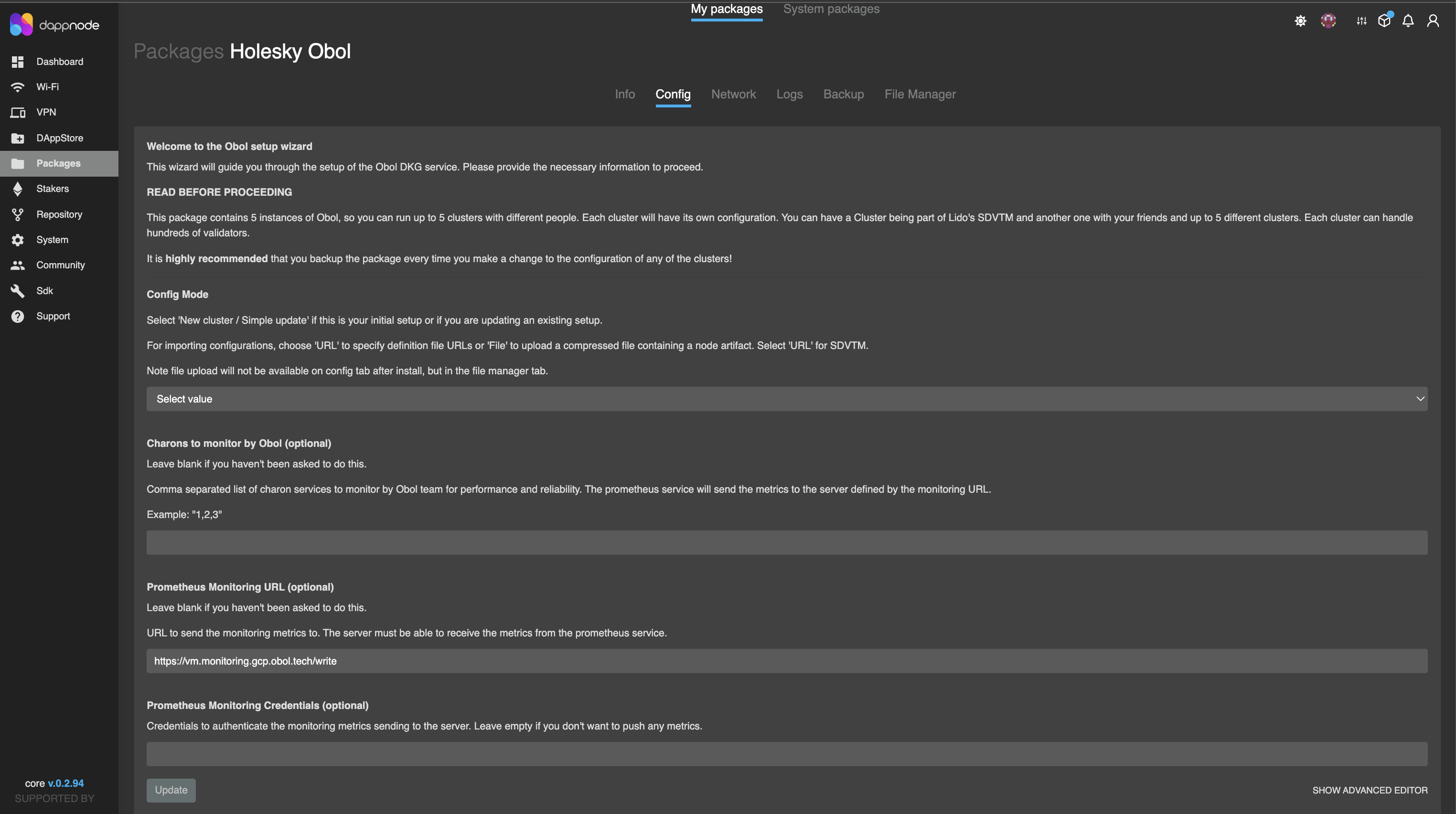
-
The advanced editor config page provides ENV configs for each validator. Scroll to the validator number you want to exit and type “true” in the column opposite SIGN_EXIT.
-
Scroll to the bottom of the page and click the 'update' button for the changes to take effect.

-
Check your logs to confirm the exit process has started.
Once a validator has broadcasted an exit message, it must continue to validate for at least 27 hours or longer. Do not shut off your distributed validator nodes until your validator is fully exited.
Other Charon exit commands
List exitable validators : The following command lists all validators in the cluster whose status is ACTIVE_ONGOING, i.e. those that can be exited. Add --plaintext to print one public key per line for scripting.
docker exec -it charon-distributed-validator-node-charon-1 /bin/sh -c 'charon exit active-validator-list \
--beacon-node-endpoints="http://lighthouse:5052"'
Delete a submitted partial exit : The following command deletes your partial exit message for a specific validator from the Obol API (use --all instead of --validator-public-key to delete partial exits for all validators). This only applies to the hosted (Charon) solution. It is useful if you signed with a different --exit-epoch than the other operators: since all partial exits must use the same epoch to be aggregated, delete the incorrect partial exit and run charon exit sign again with the correct epoch.
docker exec -it charon-distributed-validator-node-charon-1 /bin/sh -c 'charon exit delete \
--validator-public-key="<VALIDATOR_PUBLIC_KEY>"'
Exit epoch and withdrawable epoch
The process of a validator exiting from staking takes variable amounts of time, depending on how many others are exiting at the same time.
Immediately upon broadcasting a signed voluntary exit message, the exit epoch and withdrawable epoch values are calculated based off the current epoch number. These values determine exactly when the validator will no longer be required to be online performing validation, and when the validator is eligible for a full withdrawal respectively.
- Exit epoch - epoch at which your validator is no longer active, no longer earning rewards, and is no longer subject to slashing rules.
Up until this epoch (while "in the queue") your validator is expected to be online and is held to the same slashing rules as always. Do not turn your DV node off until this epoch is reached.
- Withdrawable epoch - epoch at which your validator funds are eligible for a full withdrawal during the next validator sweep. This occurs 256 epochs after the exit epoch, which takes ~27.3 hours.